TL;DR
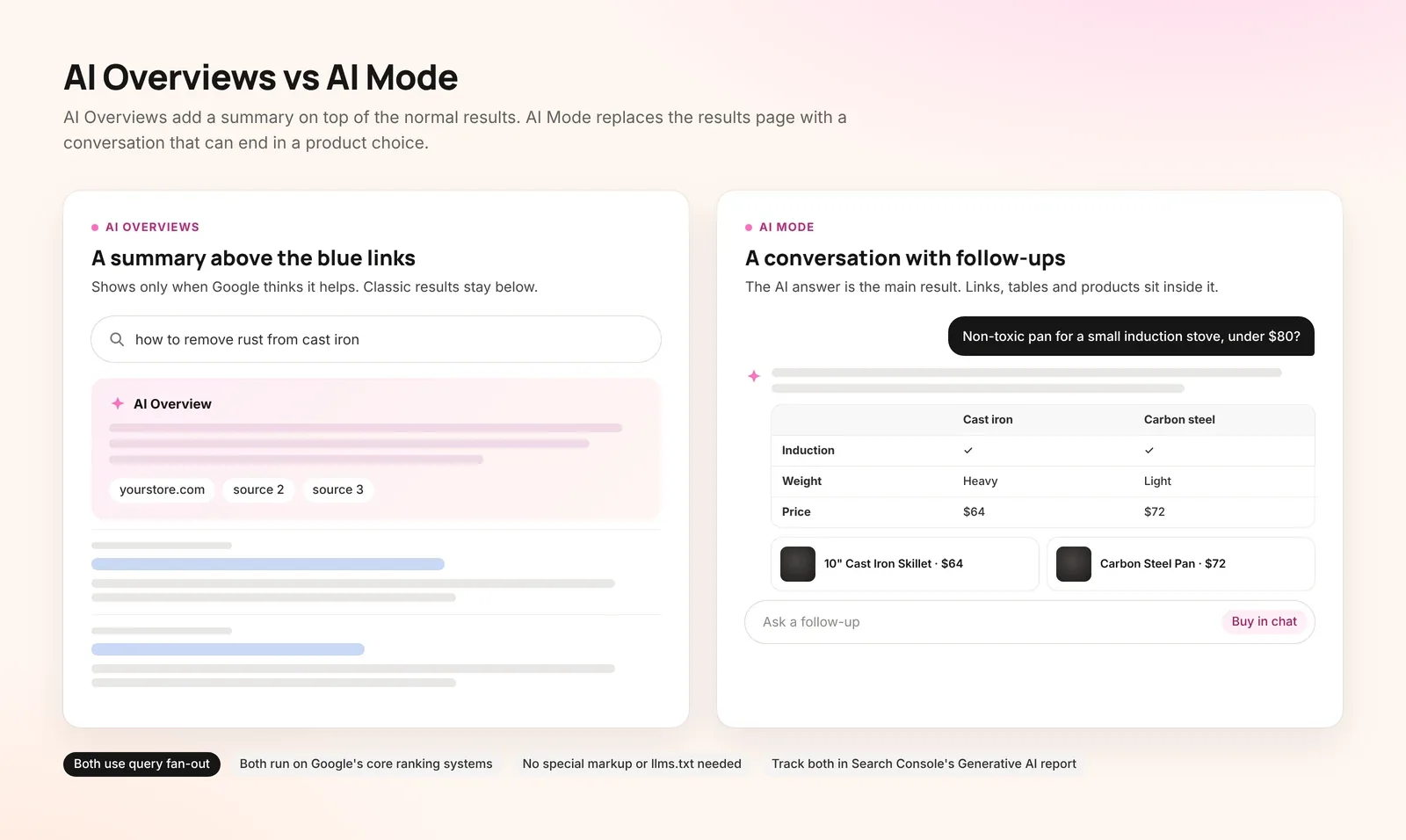
- AI Overviews add an AI summary with source links above the normal results, and only when Google thinks it helps. AI Mode is a separate, chat-style search where the AI answer is the main result and you can ask follow-ups.
- Both run on Google's core ranking systems and use query fan-out. Since November 12, 2026, Gemini 4 Hydrogen is the default model in AI Mode and handles the hardest AI Overviews questions.
- There is no special markup or file to add. Write original, well-structured pages, keep them indexable, keep Merchant Center current, and track results in the Search Console Generative AI report.
Contents
Google AI Overviews and AI Mode both answer questions with AI, but they work differently. AI Overviews add an AI-written summary on top of the normal results page. AI Mode replaces the results page with a conversation, where the AI answer is the main result and you can keep asking follow-up questions.
For a Shopify store, the difference matters because the two surfaces send different visitors. This guide explains how each one works today, what changed in 2026, and what you can do so your pages and products show up in both.
AI Overviews vs AI Mode in one paragraph
AI Overviews appear on a normal Google results page, above the blue links, only when Google’s systems decide a summary adds something. AI Mode is its own search experience for longer, multi-step questions, where people refine the answer through follow-ups. Both are built on Google’s core Search ranking systems, both link to source pages, and Google says both may use different models, so the links they show can differ for the same question.
What are AI Overviews?
AI Overviews are short AI summaries at the top of some results pages. They pull an answer from several sources and show links to those sources next to the text. The regular results still appear below.
Google’s page on AI features and your website explains that AI Overviews only show when Google judges them to be additive to classic results, so many searches don’t trigger one. In practice they show up more on longer or more complex questions, such as “how to remove rust from cast iron without steel wool.”
What is AI Mode?
AI Mode is a separate, conversational search. You ask a question, get an AI answer with links inside it, and keep asking follow-ups that build on what you already asked. Google built it for questions that used to need several searches, like comparing three products or planning a purchase around a budget.
AI Mode has also become a place to shop. Shopify’s Agentic Storefronts make eligible products discoverable in AI Mode and the Gemini app, and for some stores shoppers can check out inside the conversation. That checkout runs on the Universal Commerce Protocol (UCP), an open standard Google and Shopify developed together.
Key differences at a glance
| AI Overviews | AI Mode | |
|---|---|---|
| Where it appears | On top of the normal results page | In its own search experience |
| When it appears | Only when Google thinks a summary helps | When the searcher chooses it |
| Interaction | One answer per query | Conversation with follow-ups |
| Main result | Classic results, with a summary on top | The AI answer, with links inside it |
| Best for | Quick answers and short explanations | Comparisons, research and buying decisions |
| Shopping | Product listings can appear in the answer | Product listings, and in some cases checkout inside the conversation |
| Default model (Nov 2026) | Gemini 4 Hydrogen for the hardest questions | Gemini 4 Hydrogen |
What changed in 2026
Several updates this year changed how both features behave and how you can measure them.
May 15: Google published its own optimization guide. The guide, optimizing your website for generative AI features, says that from Google’s point of view, optimizing for AI search is still SEO. It also lists tactics you don’t need, such as llms.txt files, breaking content into small chunks for AI, or manufacturing mentions of your brand across the web.
June 3: Search Console got a Generative AI performance report. For the first time, you can see your appearances in AI Overviews and AI Mode in their own report, separate from classic web results. Discover’s AI features have a separate report. The Search report groups AI Overviews and AI Mode together, so you can’t split them yet.
September: checkout arrived in AI Mode for more Shopify stores. Google began turning on native checkout in AI Mode and the Gemini app for eligible US Shopify merchants. You can turn direct checkout on or off per channel in the Agentic Storefronts settings in your Shopify admin.
November 12: Gemini 4 Hydrogen became the default model. Google’s announcement calls it the biggest model upgrade to Search yet. Hydrogen is now the default model in AI Mode for all users and answers the hardest questions in AI Overviews. Google says answers now include more images, comparison tables and custom tools, and handle long questions with several requirements better.
Google is also still testing the layout. In mid-November, some searchers saw results without the AI Mode tab or the follow-up box under AI Overviews, as Search Engine Roundtable reported. Treat the interface as something that will keep changing, and focus on what stays the same.
How query fan-out decides which pages get cited
Both features may use a technique Google calls query fan-out. The system splits a question into related sub-questions, searches for each one, and combines what it finds into one answer.
Take a shopper who asks AI Mode for “a non-toxic frying pan for a small induction stove under $80.” Fan-out might search separately for induction-compatible pans, non-toxic coatings, small pan sizes and price ranges. A store page that clearly answers one of those sub-questions can be cited, even if it never uses the shopper’s full sentence.
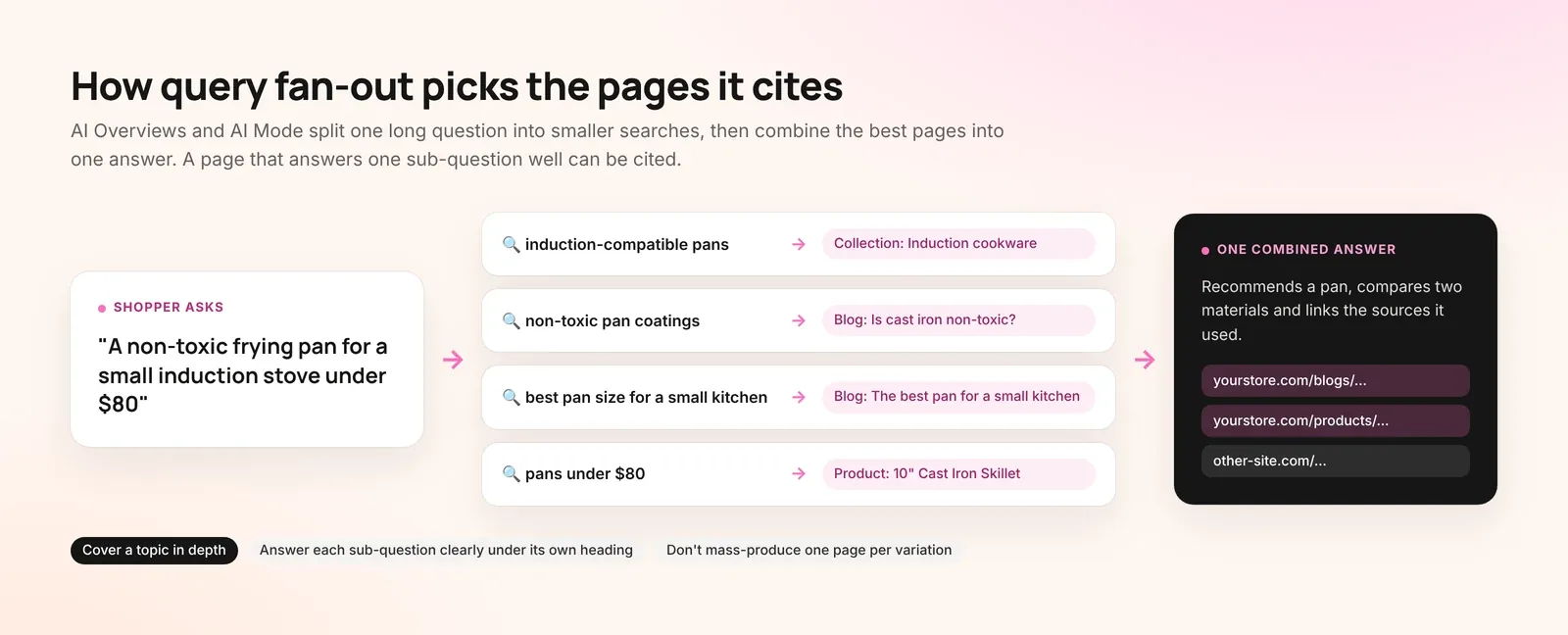
That is why depth across a topic helps more than one perfect page. Google’s guide warns against the opposite approach, too. Mass-producing a page for every fan-out variation falls under its scaled content abuse policy.
How to appear in AI Overviews and AI Mode
Google is clear that there are no extra technical requirements beyond normal Search. A page must be indexed and eligible to show a snippet. The 2026 guide adds one setting to check: your site must be included in the Search generative AI features setting in Search Console.
After that, the work is ordinary SEO done well:
- Answer the question early. Put the direct answer in the first lines of the page or section, then add the detail.
- Write what only you can write. Google’s guide asks for original, non-commodity content based on first-hand experience. A store that tested five pans on an induction stove has something a generic summary doesn’t.
- Use clear headings. Each section should cover one sub-question, so it still makes sense when it’s quoted on its own.
- Be specific. Measurements, comparisons, steps and real photos are easier to cite than general statements.
- Keep pages crawlable. Check that robots.txt, a CDN or a password page doesn’t block content you want cited.
- Keep product data current. Google names Merchant Center and Google Business Profile as the places that feed product and business details into AI answers.
- Add images and video where they help. AI answers increasingly show media next to the text.
You don’t need an llms.txt file, special schema or a separate “AI version” of your content. Structured data still helps with rich results, but Google says it isn’t required for AI features. Read more: Is llms.txt worth it for SEO?
What happens to your traffic
Simple questions now get answered on the results page, so some searches end without a click. Google says the clicks that do come from pages with AI Overviews tend to be higher quality, with visitors spending more time on the site.
For a store, that means informational posts may get fewer visits, while the visitors who arrive are further along. The posts that hold their value are the ones that lead somewhere: a comparison that links to the right product, or a guide with the product placed where it solves the problem. Read more: How to sell through blog posts on Shopify.
To measure it, use two reports side by side in Search Console:
- The Generative AI performance report, to see how often your pages appear in AI Overviews and AI Mode.
- The regular Performance report, which still includes AI feature clicks and impressions inside the Web search type.
Then connect both to revenue in your store analytics, because a cited post that leads to sales is worth more than one with more visits.
How to control what AI features show
The standard preview controls apply. You can use nosnippet, data-nosnippet or max-snippet to limit what Google shows from a page, and noindex to keep it out of Search entirely. These also limit how the page appears in AI features, so use them with care on pages you want to sell from.
Blocking Google-Extended in robots.txt is a different control. It affects how your content is used for training and grounding in other Google AI products, not whether it appears in Search.
FAQ
Is AI Mode replacing Google Search?
No. AI Mode is one way to search on Google, alongside the classic results page with or without AI Overviews. Google keeps testing where AI Mode appears in the interface, but both features sit on the same index and ranking systems, so the same SEO work supports all of them.
Do I need different content for AI Overviews and AI Mode?
No. Google says both use its core ranking and quality systems, and there is no separate optimization for either one. Write clear, original pages that answer specific questions, keep them indexable, and keep product data in Merchant Center accurate. The links each feature shows can still differ, because they may use different models.
Can my Shopify products appear in AI Mode?
Yes. Product listings in AI answers come from Google’s shopping data, so connect your store to Merchant Center through the Google & YouTube channel. Eligible stores can also sell through Shopify’s Agentic Storefronts, where some shoppers can check out inside AI Mode and the Gemini app.
How do I know if my pages appear in AI Overviews?
Use the Generative AI performance report in Google Search Console. It shows how often your pages appear in AI Overviews and AI Mode, grouped together, with a separate report for Discover. Compare it with your regular Performance report and your sales data to see which cited pages bring buyers.
Conclusion
AI Overviews summarize one search, while AI Mode turns search into a conversation that can now end at checkout. Both reward the same things: original pages that answer specific questions, clean product data, and nothing that blocks Google from reading your content. This week, check your Search Console Generative AI report and ask AI Mode three questions your customers ask, then write the post that answers the one where your store is missing.
Write posts that are easy to cite
Build clear Shopify blog posts with headings, tables, FAQ and product blocks, then see which posts sell.
Get for freeSources
- Google Search Central, “AI features and your website,” https://developers.google.com/search/docs/appearance/ai-features, retrieved 2026-11-17
- Google Search Central, “Optimizing your website for generative AI features on Google Search,” https://developers.google.com/search/docs/fundamentals/ai-optimization-guide, retrieved 2026-11-17
- Google Search Central Blog, “A new resource for optimizing for generative AI in Google Search” (May 15, 2026), https://developers.google.com/search/blog/2026/05/a-new-resource-for-optimizing, retrieved 2026-11-17
- Google, “Google Search gets a major upgrade with Gemini 4 Hydrogen” (November 12, 2026), https://blog.google/products-and-platforms/products/search/gemini-4-hydrogen-search-upgrade/, retrieved 2026-11-17
- Shopify, “How agentic commerce works,” https://www.shopify.com/blog/how-agentic-commerce-works, retrieved 2026-11-17
- Search Engine Roundtable, “Google Tests Dropping AI Mode From Search Bar & Ask Anything” (November 13, 2026), https://seroundtable.com/google-dropping-ai-mode-again-42534.html, retrieved 2026-11-17