
Getting Started
Getting Started

AI Agent
AI Agent

Topical Map & Clustering

Blog Builder
Blog Builder

How To's
How To's
AI Agent
AI Agent
Topical Map & Clustering
How To's
How To's
How To's
/
How to add a quote section to a blog post in Shopify?
How to add a quote section to a blog post in Shopify?
Learn how to add a quote section to a blog post in Shopify.
3 min read
To add a quote, drag the Quote block into your vevy blog post, type your quote text, and add the author if you like. It's a clean way to highlight a review or a key line.
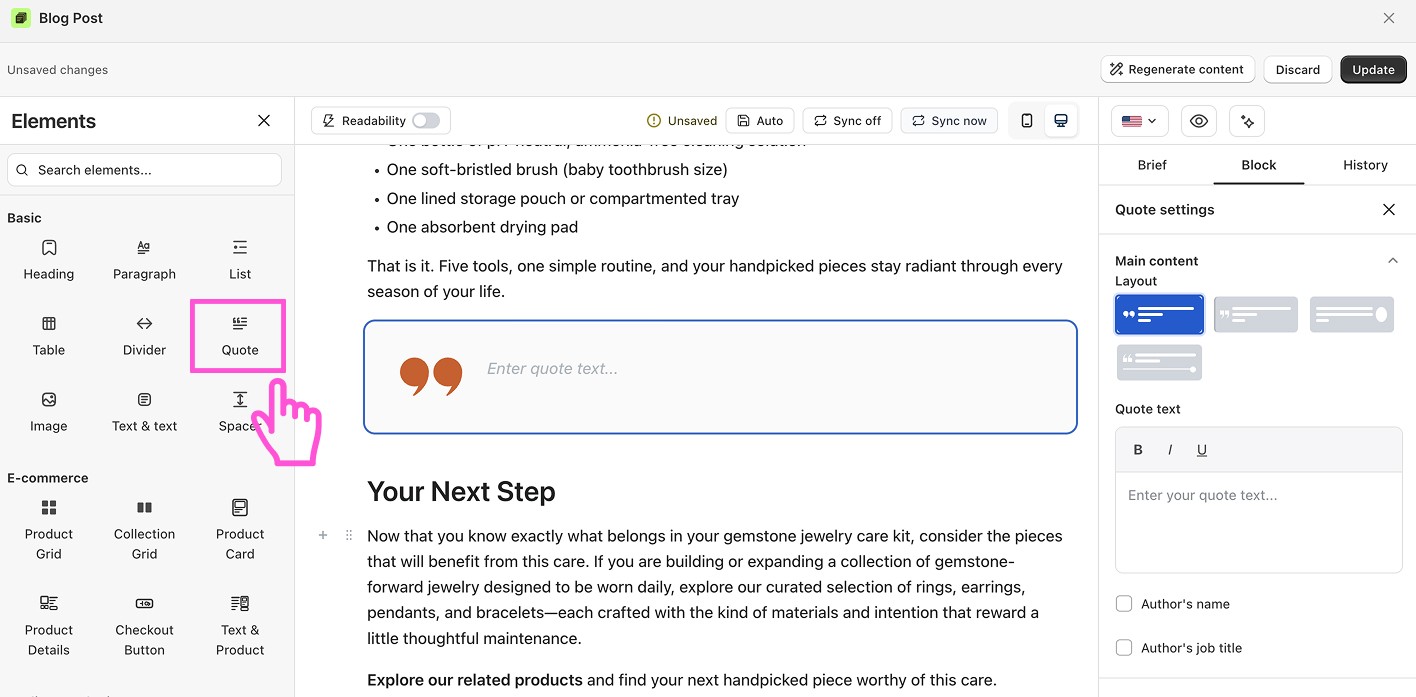
How to add a quote block to a Shopify blog
Open your post in the Blog Builder.
In the Elements panel, open Basic and find Quote.
Drag the block into your post.
Click it to open its settings on the right.
Type your quote text.
Turn on Author's name and job title, then fill them in (optional).
Pick a layout and colors.
Save or publish.
Want to see blog builder in action?
Install vevy.ai for free and create stunning blog pages
Want to see blog builder in action?
Install vevy.ai for free and create stunning blog pages
Want to see blog builder in action?
Install vevy.ai for free and create stunning blog pages
What you can customize
Quote text with bold, italic, and underline
Author name and job title
Quote, author, symbol, and background colors