




How To's
/
How to add a CTA button to a blog post in Shopify?
How to add a CTA button to a blog post in Shopify?
Learn how to add a CTA button (or any button type) to a blog post in Shopify
3 min read
The vevy.ai app is an AI blog app for Shopify. It helps merchants write, build, and optimize blog posts for search engines, and track how those posts drive traffic and sales. In the vevy.ai editor, you can add content blocks to your blog posts, including a CTA (call-to-action) as a button or banner.
How to add a CTA button to a Shopify blog
To add a call-to-action to your Shopify blog, install the vevy.ai app for free, open your post in the vevy.ai app editor, and drag the CTA Button (or banner) block to where you want it. Then, set the button text and link, customize the colors if you want, and save. That's it!
The button guides readers to the next step, like shopping a sale.
Here's is the step-by-step guide to how to add CTA to your blog posts in Shopify that are visually great.
Install the vevy.ai app for free from the Shopify App Store.
On you Shopify admin, open the vevy.ai Blog Builder app.
Open your post in the app.
In the Elements panel, open Media & Marketing and find CTA Button.
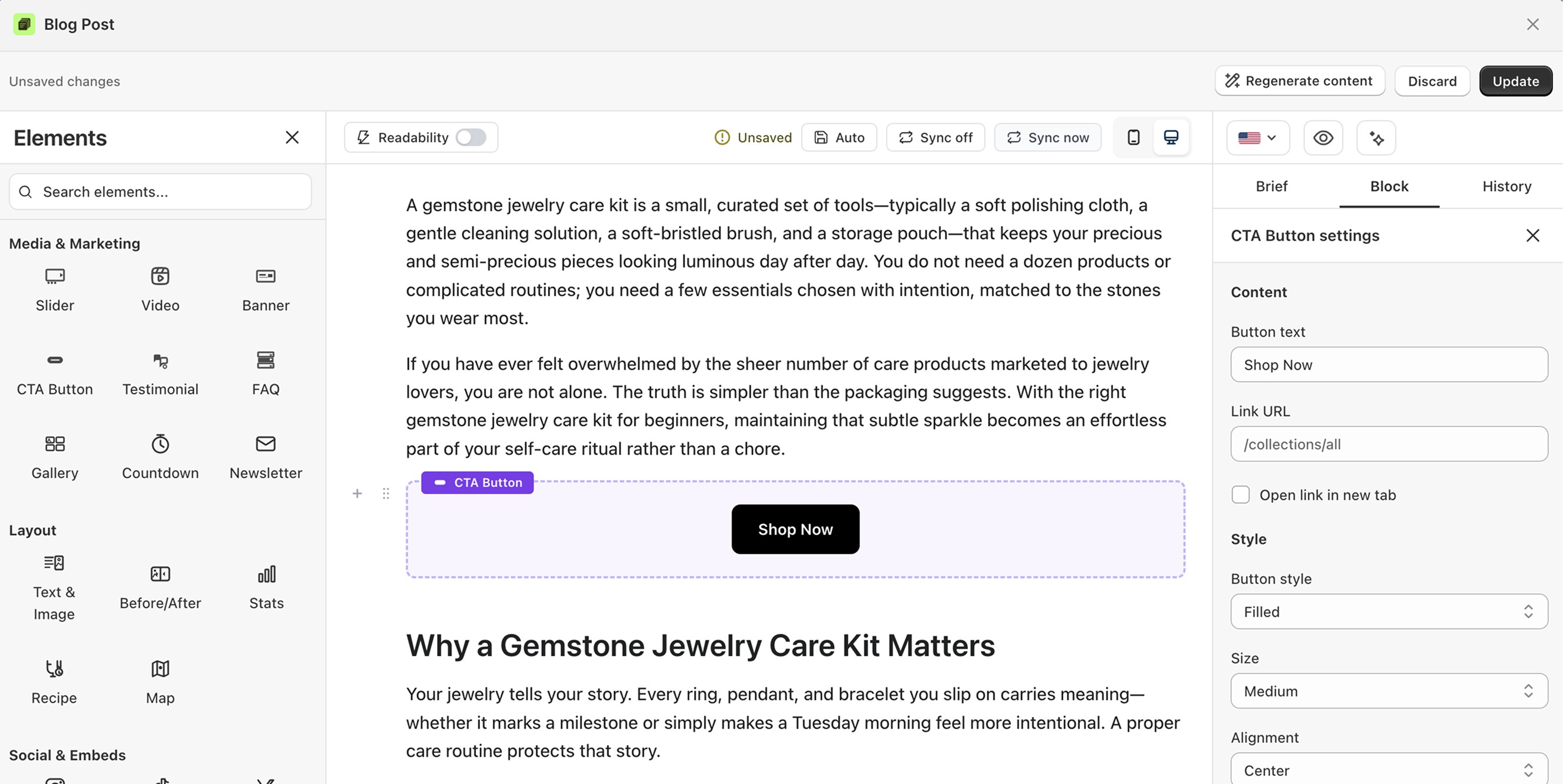
Drag the button into your post.
Click it to open its settings on the right.
Set the button text, like "Shop Now."
Add the link URL where it should go.
Style it: filled or outline, size, color, and alignment.
Save or publish.
This step is the same for banner (which is a section with background color or image).
If you don't know what to write as a CTA, you can get help from content brief that vevy.ai generates for each blog post.
When vevy.ai generates the content brief for a post, it includes CTA ideas written for that specific topic and intent. So, the ask matches what the reader just finished reading.
Click Generate Brief in the editor, open the Brief tab, and pick the CTA that fits. Paste it into the button text, point the URL at the right collection, and you're done.
What you can customize
Button text and link
Open link in a new tab
Filled or outline style, size, alignment, and colors
Full-width option
FAQ
What text works best on a CTA? Short action words, like "Shop Now" or "Get the deal."
Can the link open in a new tab? Yes. Turn on "Open link in new tab."