
Getting Started
Getting Started

AI Agent
AI Agent

Topical Map & Clustering

Blog Builder
Blog Builder

How To's
How To's
AI Agent
AI Agent
Topical Map & Clustering
How To's
How To's
How To's
/
How to embed LinkedIn posts to a blog post in Shopify?
How to embed LinkedIn posts to a blog post in Shopify?
Learn how to embed LikedIn posts to a blog post in Shopify
3 min read
To embed a LinkedIn post, drag the LinkedIn block into your vevy blog post, then paste the post URL or embed code. It adds trust and a professional touch to your content.
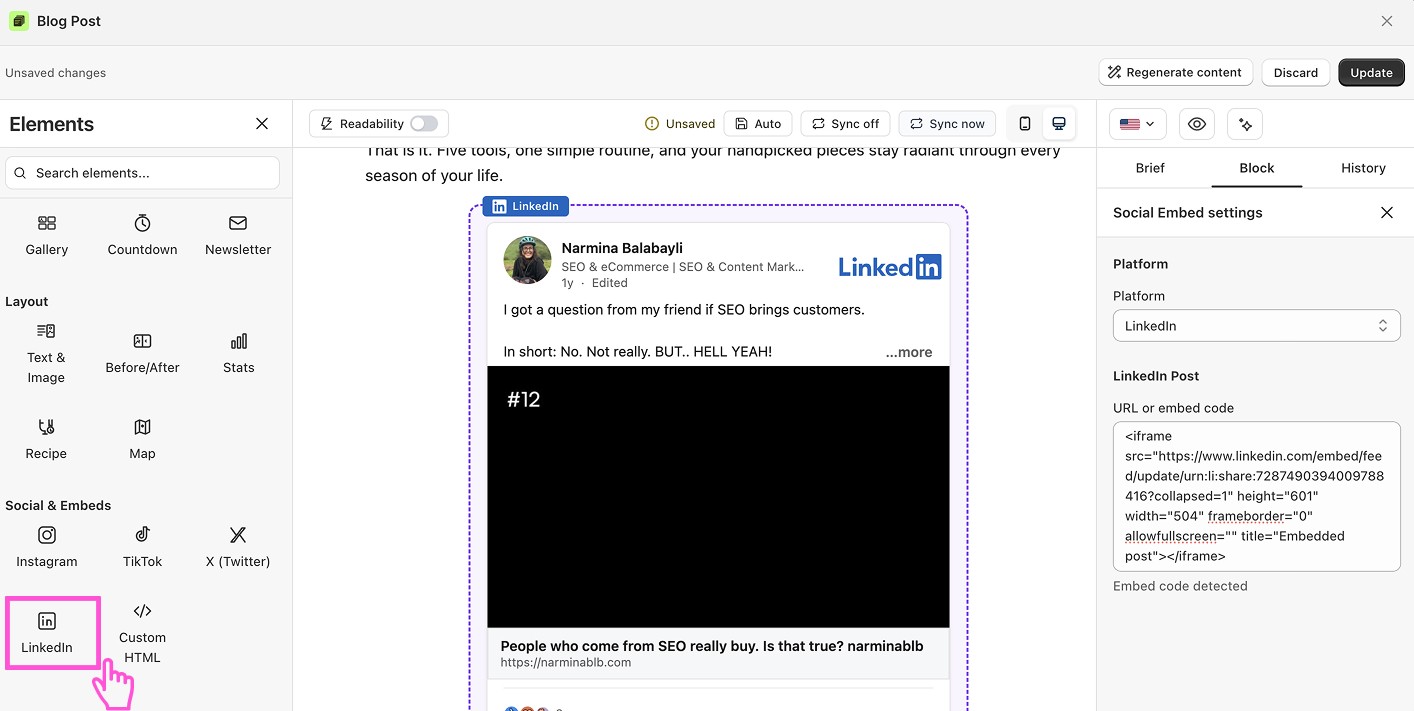
How to embed a LinkedIn post in a Shopify blog
Open your post in the Blog Builder.
In the Elements panel, open Social & Embeds and find LinkedIn.
Drag the block into your post.
Click it to open its settings on the right.
Paste the LinkedIn post URL. Or copy the embed code from LinkedIn and paste it.
The post appears in your blog.
Save or publish.
Want to see blog builder in action?
Blog builder is FREE. Install vevy.ai for free and create stunning blog pages
Want to see blog builder in action?
Blog builder is FREE. Install vevy.ai for free and create stunning blog pages
Want to see blog builder in action?
Blog builder is FREE. Install vevy.ai for free and create stunning blog pages
FAQ
How do I get a LinkedIn post link? Open the post, click the ··· menu, and choose Copy link to post or Embed this post.
Is LinkedIn good for store blogs? It works well for B2B brands, company news, and building trust.